Faking it till you make it?

I’ve been a teacher for 10 yrs now, and I know there is a small niche group of art teachers out there. Then within that group there is a subset of us teaching digital art. I realized after switching to high school last year that it was such a tough time. I had to rethink everything I was doing. I try and post and share because I know that there are other art teachers that are making the change or trying to add more digital curriculum to their lessons. It can be really overwhelming.

I also think some times it is really hard to figure out where I can I find resources to help me out with classroom management and lessons. I’ve been trying to post resources as I go along to let other teachers know we are all trying to figure things out.

That’s part of why I like teaching it is something that evolves and changes over time. Very challenging.  I also really enjoy watching my students develop their skills in graphic design. I’ve worked in the profession. I know even if they don’t ever become a graphic designer they could one day own their own business or work at a higher level within a company and have to work with a marketing department. I want them to know what you should expect from someone that says they have that expertise.

I still try and freelance graphic design/illustration on the side. What surprises me that at some point we all start out as newbies. We all have to learn by getting some professional experience. I’ve see in the professional world that people say they have the expertise and fall short. I think of it like teams sports. Someone comes along and says they are the best player in the league and the team/coach says let’s give them a shot. They fail and have no idea even how to throw the ball. It is painfully obvious that they oversold their abilities. It’s better to be honest and say “I really don’t have the experience, but I’m learning on the job.” The idea of faking till you make is really strange to me. I’ve never told a client I can do something, knowing that I can’t do it. I’ve told a client let me look into this and see, but then I’ll get back to you. I let them know that is beyond my skill level or I just don’t have the equipment. I never want to lie to client, because that wastes their time and money. I also don’t do work just because it pays. I really don’t like web designing, so I stay away from that.

In this age when things can be faked to look like something else. I should know I teach graphic design and I lean heavy on advertising. I tell my students that, I teach animation, but I’ve never worked in that industry. I let them know that as a fact. I say I don’t know let me get back to you on that instead making something up. I also say have you Googled it?

Technology related pathways are constantly evolving and changing. There are updates getting pushed out every other week on software. New software companies are emerging to compete with current software. It’s a lot for to keep up with. I feel like as education continues the students need to have that motivation to learn on their own, because many times there might not be a simple path from A to B that is clearly defined that you can learn from a textbook and teacher. Sometimes getting in there, try different ways, making honest mistakes, and doing the work is the best learning experience.


Graphic Design Wk 11

I’ve started having my students create their own logo designs for their own personal brand or a company they would like to own in the future. I had them fill out a worksheet that I created and then I have them create their own mind map that connects to them. It is like a mood board that lets you see how things are related to each other. Then they are going to create sketches, and then create the logo in Adobe Illustrator.

My students this semester have a stronger sense I think of what they want to do already. I’m curious to see what the final results will be. They will turn the logos into stickers. We will also create a line of products to put their logo on.


Animation Wk 10


I started having students use Adobe Animate CC to create a bouncing character. It’s a lot like the bouncing ball animation we did in Photoshop CC 2019 at the beginning of the year. Next year I feel more confident about having students work mainly in Adobe Animate. It took me time to build up my own confidence. I feel like after teaching this for the 3rd semester I feel way better about understanding what is working and what isn’t. I’m sure there will still be things I need to learn, but the on the job training and working with my students is bring back all the muscle memory of using it. I’m so much faster at all of this then when I first started.

I gave them an image of the ball character. Then they go step-by-step in recreating it. On Monday we are going to finish creating the character. Tuesday we will starting animating the character in Adobe Animate. It will make more sense when they see how we can make part of the character face animate, but then have the character move in the scene. I’ll have to post some examples when they finish.


Pinterest Pincodes

pincode_126452770726566215pincode_126452770726566216pincode_126452770726566217

I noticed on my pinterest account that they added pincodes.  I figured I would try it out. I could see this being a great way to share your lessons and people in the real world. I did a workshop once at the Georgia Art Educators Association in Macon, GA, and I had 75 attendees. That’s a lot and then I realized all the teachers wanted digital resources of the lesson I taught this would be a great way to hand out a card with the code and then they use the Pinterest Lens to scan it. I think this is something I would print out on a sheet and then folks could scan and then follow the board. I’ve learned more and more about how pinterest is working and I’ve been a fan of it since a good friend of my introduced it to years ago. Teachers in particular are heavy users of it. Just a tip for this this week.

Animation Wk # I’m not sure anymore

Screen Shot 2019-03-15 at 10.31.22 PM.jpg

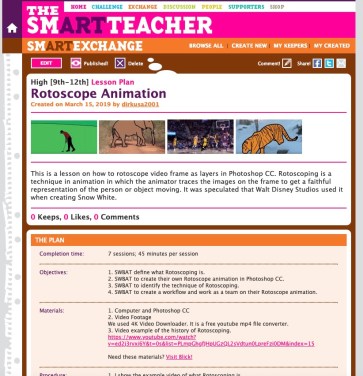
Man the year is flying by. I’m at a loss for what week I’m on only that we are currently working on Rotoscoping in Photoshop CC. Rotoscoping is an animation technique of tracing video footage frame-by-frame. It is pretty tedious. I’ve taught this for the 4th semester. I think I’m getting better at explaining how it works. Thank goodness!

I’ve had some good results from when students work in teams. One of my favorite examples is from last year. Roto Jelly Fish.

If you are interested I’ve posted the lesson on the smARTteacher site. I’ve provided some PDF resources as well and some examples of frames from student work. Click on the link to go to the lesson Rotoscope Animation.

Tomorrow is St. Patrick’s Day. It’s a big deal where I live. Have a happy day!

Dickblick.com

06_Canson_MixMedia

I’m not going to post lessons this week. I’m in a starting phase next week, and I would like to post some image as well when they are finished. I decided to make a purchase of some new art supplies. I’m teaching a beginning drawing class at Georgia Southern University for the Continuing Edu Classes at Night. They classes are 2 hrs long at once a week. I’m so looking forward to getting back to drawing classes. I do my work digitally now but I really enjoy drawing by hand. I feel like my Wacom Cintiq gets pretty close, but I still love pencil, pen & ink, and watercolor.

I noticed on the website when I was ordering they are doing BOGO’s depends on what you are ordering. I saw it for the Canson XL Mix Media Pads. I like these drawing pads a lot. Own a smaller one, and I use it for pen/ink, watercolor. It doesn’t bleed through. The paper is a strong cold press and has a nice tooth.

There are some Tombow pens that they are also doing a BOGO special when you buy a set. I decided not to get that. I’ll have to wait to invest in the Tombows. I’ve heard great things about their pens.

I will do a video unboxing and try some facebook live video feed when I get my purchase and also try to video record me unboxing everything using my digital camera. We’ll see how that video set up goes. I’ll tell you about the quality of the supplies I got. I think I’ll try and do a demo for the products on my instagram.

I’ve been seeing lots of social media ads for Arteza. I like the look of their products. Never used them, but their watercolor brush pens have been calling my name. Stay tuned for some art supply reviews. I miss working in traditional media.

Graphic Design wk 8

Screen Shot 2019-03-02 at 4.29.18 PM.jpg

Still working on the same project. I’ll be introducing some new photo projects. Taking photos of small people. I bought them originally on Amazon, but they were really small so pay attention to the ratio size. I ended up going to Hobby Lobby so I could see them.

Then they will also work on product photo shoot. Athletic energy drink. I have my photo booth that we will use to set up with props.

Animation Wk 8

Green screening project is still going on this week. They are due this week. I think it will be due at the end of class Friday. I still need to teach students how to mask themselves and adjust the settings of the mask to get a cleaner looking mask.  This is a good video for ideas for how to make your own green screen. I agree with the idea of having good lighting. It’s not exactly animation but it is fun to do.

Sam Time Green screen

I made a checklist of what they needed to record on the green screen.

  1. Video yourself flying. Using a stool.
  2. Video yourself falling. I had student even lay on the green screen.
  3. Video yourself trapped in a box.
  4. Video yourself lifting something heavy.

Those are just a few ideas.