Navigate 1 – Commercial vs. Open Source Virtual Classrooms

1. What are the strengths and weaknesses of open-source versus commercial software?
I’ve used Google Hangouts for open-source software when teaching and collaborating. Since it is open-source it is easy by just signing up for a Gmail account or if the school district uses Google for Education the students will have a Gmail account that they can use. It was not always the most straight forward getting the hangout to work. Probably the hardest part was figuring out how to meet online at the appropriate time frame. At times it could be laggy. With open-source, there are forums that you can post questions but no troubleshooting department to address issues.
I’ve taken a course using the Blackboard Collaborate for a graduate course. The instructions had multiple ways they could video connect with students via the Blackboard. They could use a desktop, or smartphone to hold conferences live. The conversations could be archived for future reference. It seemed much more integrated with the virtual classroom.

2. When would an open-source application take precedence over a commercial product?

I’ve used Google classroom and paid LMS. The problem I found that the districts did not want to pay for the added features in the paid LMS. It was beyond their budgets. It could be hard on the teacher when the district could no longer afford it and then switch to something else.

3. What are the issues when choosing between Open Source vs Commercial Software?

Everyone’s situation is different. Budgets are different, devices, and upload/download speeds can require that you take the time to test and demo each version.
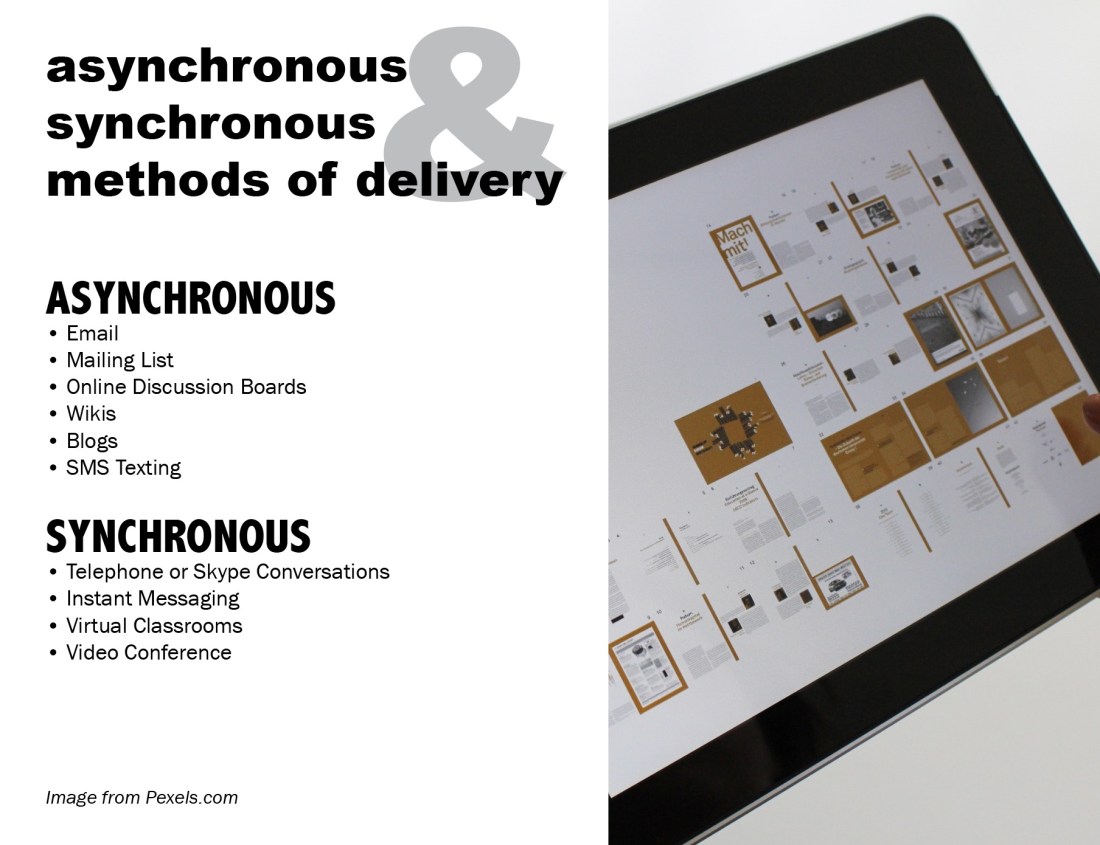
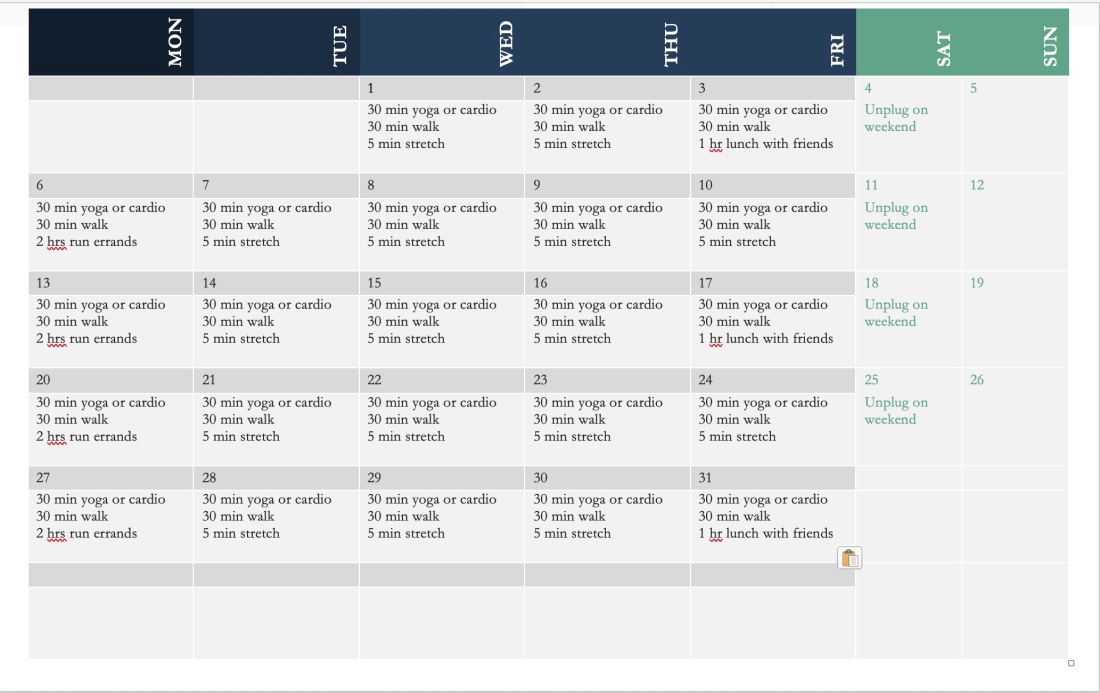
Participate Reflection

  • Standard C: The online teacher plans, designs, and incorporates strategies to encourage active learning, application, interaction, participation, and collaboration in the online environment.

  • Standard E: The online teacher models, guides, and encourages legal, ethical, and safe behavior related to technology use.

  • Standard J: The online teacher interacts in a professional, effective manner with colleagues, parents, and other members of the community to support students’ success.

iNacol

  1. How has the Participate module prepared you to meet each standard listed above? For each standard, link to or provide specific examples from your work in Participate.
  2. What strategies will you take away from the Participate module and apply to your teaching? Explain why.
  3. What lessons were most beneficial for you? Explain why.

    The Participate module of the Effective Online Teaching Course has been helpful to prepare me for providing students with an understanding of the online environment. As an instructor, one should not assume that students will know the netiquette and consequences of their actions in the online environment. One of the strategies I would use from the beginning of teaching online is an AUP. An acceptable use policy allows all parties to know what is acceptable in the online classroom, similar to classroom policy and rules. All teachers do them, and it should also be extended to the online classroom. Providing an environment that students feel comfortable having these discussions is an important part of teaching.  The lesson on digital safety I felt was the most beneficial because I was able to create a powerpoint presentation on the topic. The powerpoint presentation I created that discusses the topic of digital safety would be utilized in going over the rules and consequences of students’ actions.

Participate 3 – Digital Health

Screen Shot 2019-11-26 at 12.39.19 PM1. How did you modify your technology habits?
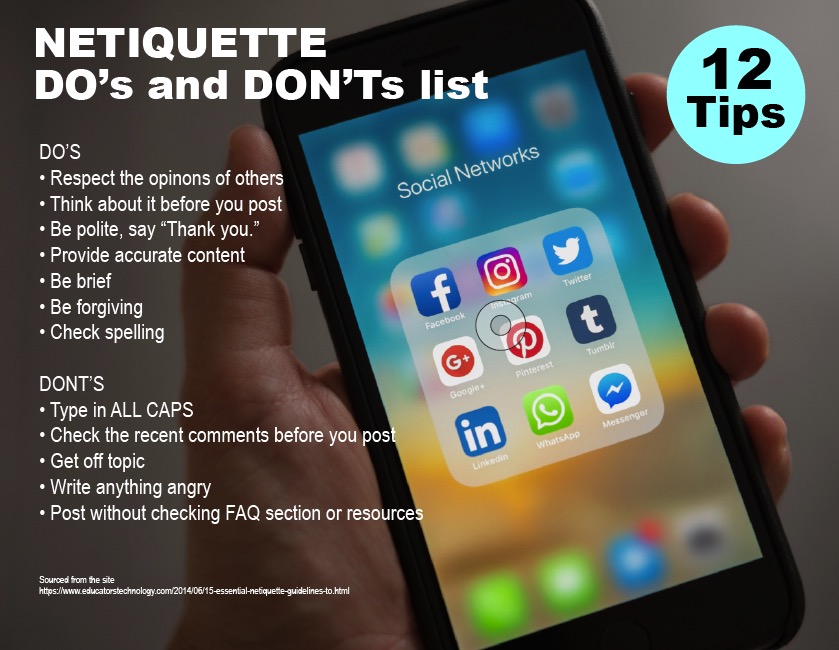
Creating a calendar that makes one mindful of what they are doing during the week. I also would want to have a timer on my computer to remind me to stretch or sit up straight every 30 min. Making time to get away from the computer and unplug is very helpful.

2. What are the most proactive means of ensuring the most balanced blend of technology and well-being?
Set up your work environment on the computer for what makes sense for you. I had to put my computer at a position that required me to stand. I do not want to sit for too long. I also try and make sure to take breaks.

3. What can students and teachers do to make sure they get the most from technology while simultaneously safeguarding good health?
Make a conscious effort to think about how much time is good for sitting and try and work in breaks and exercise. Try and set up the computer to prevent fatigue for your wrist and back. I found yoga to be very helpful.

Participate 3 – Digital Safety and Security


  1. What is the most important step we can take in terms of ensuring our digital safety?
    Education and awareness of the issues that can be a problem when students are online. Developing this awareness will prevent scammers and hackers from getting access to your information and computer. The site Consumer FTC Gov Site has some great tips for staying aware of the problems that can occur from being online.
  2. What strategies can we take to help our students consistently keep digital safety in the forefront of their minds?
    Open discussions regarding digital safety are important. Having an open dialogue about the issue is really important than when students do have a problem they know what to do. Having these discussions on a regular basis and encouraging parents to discuss digital safety is key to having students feel like they have options and solutions to the problem. I would want to post an image of the poster below to have students remember some tips on digital safety.

Here is a link to view my Google Slides presentation I created based on this topic.

Digital Safety and Security

Participate 3 – Digital Rights and Responsibilities

This is my plan for AUP for students and parents to sign when they are taking my class.

I would have students and parents read over and sign AUP contract for how they should use the internet during the course.  This would help educate parents and students on the expectation of how devices and the internet should be used for the course.

The plan would encourage ethical behavior. Explain the consequences for the behavior.  Students would understand what is considered fair use and copyrighted material. Places to go to learn how to cite and create a bibliography for papers. For art history, students would use Chicago/Turabian Citation.

Students would learn how to protect their privacy while online and communicating with others. Keep private information to themselves.

Students would learn how to show polite and correct behavior online. I think it is important for students to learn how to address each other in discussions and emails to one another.

Discourage online game playing and software piracy.

  1. How can a DLC ensure that citizens within the community have access to an environment where an AUP protects members as well as the community itself, where individuals uphold laws, and a cooperative/collective venture provides robust, safe, and ethical resources and opportunities for learning?Providing students and parents with an outline of what is expected helps everyone know what is allowed and not allowed during the course. It gives students a framework to go by so they are in a safe learning environment online.
  2. What is the best way to establish and maintain a flourishing DLC where citizens understand, observe, and are inclined to willingly support and ultimately benefit from Digital Rights and Responsibilities?I go over rules often. I think even with high school students a syllabus and class expectations are given at the beginning of the year they forget. I’ve done some quizizz to make it fun to go over my class rules. Reminders are a good thing, and also have the AUP posted in a prominent part of the online class would be helpful, so students can find it easily.

Participate 2- Accessing Digital Learning Communities

Describe the results of researching your level of access to digital resources.  Then answer the following questions:

During my researching of my level of access to digital resources, I checked out my Fixed Broadband Deployment from the Federal Communications Commission. I do not have the greatest broadband speed for upload and download. It is the second slowest connection in the neighborhood. In the past, I have had to go to a nearby cafe to upload or download larger files for my content for my students. For online browsing or streaming, it has been fine, but if you are submitting larger files it can be time-consuming. I’m fortunate I can afford to drive and find a cafe, and I have a laptop that I can upload my files with.

1. What types of barriers might impede students’ opportunities to access digital learning?

When I taught in a low-income rural community the access to devices could be a problem. The county decided to go to one-to-one devices. Then the problem became that students didn’t all have access to the internet to do their school work at home. The county then provided hotspots on the buses that they stationed in those areas. Eventually, the buses were removed because they found there wasn’t enough use to justify the cost of it. I can see if you don’t have access to a device or the internet it can prevent you from doing the school work you have been assigned.

2. What might we do to eliminate such barriers?

As I mentioned above having device that they can use to connect to the internet is helpful. Most of my students had smartphones, but it would be hard to design or write an entire paper on it. Providing students with an iPad or Chromebook would be the first step. Then have a way for them to connect to a hotspot so they can access the internet. For students with disabilities having the appropriate apps installed on their devices could help them have things read aloud to them or provide them with alternate ways to understand the content they are learning.

Participate 2 – Collecting Reputable Digital Resources

Post in your blog: Describe the walkabout experience and include the link to the list of social-bookmarked resources compiled during the exploration.

I decided to do some searching for reputable sites for my classes and organizing them in Symbaloo. I decided to give the bookmarking site a real try. I liked it a lot better then I thought I would. I decided to bring together sites that I use for finding images for presentations of artwork. I started collecting sites. I also found some new resources that included first-person interviews of contemporary artists. I installed the WOT app to my chrome browser as well to rate how reliable as the site was.

Here is the Symbaloo board that I created.
https://messyartteacher.symbaloo.com/home/mix/13ePGdTUiW

  1. What were the three most useful tools or resources resulting from the web walkabout?
    I tried to use sources that found that have reliable content creators. TedTalk, PBS, and major art museums. Major art museums would have researched and curated information on their sites. I’ve also used Google Scholar for looking for material I can cite in research papers. Is this a source reliable and how recent was the post made? Is it an opinion or factual? Who is the author?
  2. How can students be taught to safely collect tools and resources that can help them maximize their learning?
    The Evaluating Resource provided in the unit by the Baker University Library was helpful.
    I would recommend that they read the content and decide does it sound like it is a scholarly reliable source? Or is this not appropriate for a high school or college-level course assignment to cite. The database searches can be helpful, but I had to read the articles.
  3. What policies or procedures might need to be in place to make the above item possible?
    Providing a checklist like the one in the unit would be helpful for students to see if the source is reliable.  Here is a link from the ThoughtfulLearning site.  I would use that as an activity for my students.
    It would be helpful as the instructor to provide links to sites and sources that are reliable. I would create a video that explains my expectations for sites that would be a good place for students to visit. In my classes, I review and check the credibility of the person that I’m sharing the information with my students. For art history research students need to stay away from Wikipedia and ArtStory.

Participate 1 – Ideal Digital Learning Communities

Consider what would be needed to create an ideal digital learning community by investigating the information presented in this lesson.

  1. What would be needed to bring an ideal learning community to fruition? 
    I’ve been pursuing my MFA from the Savannah College of Art and Design eLearning program. My degree will be in Illustration when I finish in the next year and half. The ideal learning community would have as much participation between all of the students and each other. There would be meetings times online via video conferences, online discussions, and chats. We had access to each others emails and I created a Microsoft 365 Group with everyone’s email in it. We would ask each other questions regarding the course that we might feel too intimidated to ask the professor. We could field questions away from the discussion boards.

    There is, of course, the rule of three when posting. We had to post and reply to three others that had not received feedback on their artwork. Most everyone commented more than three times. This activity in the community helped rely on each other for feedback in addition to the professors. Each student has certain strengths in color, composition, concept, contrast, or craftsmanship we could all learn from. We would share additional resources. The professor would also provide draw overs on the students’ work see what improvements could be made. The professor also provided video/audio critique feedback, so we felt more like we were in a classroom with her.

  2. What can one do to make an existing DLC more attractive to and welcoming for students and teachers?
    Spending time having students introduce themselves in a blog post. I think there has been participation amongst the students. That needs to be prompted by the instructor. The more that students engage online they more they feel comfortable about interacting with each other. If there is a way for students that can work in teams. I teach animation and have students work in teams of 2-3 students in a studio. The same idea can apply online. They would need to chat and discuss with each other and work together collaboratively online. Some students may prefer working alone, but I think having group projects can prompt more interaction and real-world applied arts applications. There are tools within Google Edu and Microsoft using Teams to create this type of environment.

Participate 1 – Joining a DLC

I tried several bookmarking services that were new to me. I currently teach the following subjects: graphic design, photography, animation, and game design for high school.

I tried Symbaloo, Google Bookmarks, and Diigo. I’ve been using Google Bookmarks and Zotero for some time, but often Bookmarks can get quite cluttered. I thought Symbaloo looked a bit elementary school-like in the UI/UX design. Diigo was what I preferred. Here is a link to the sites for you to try them out. I also had used Zotero for my graduate course in contemporary art. This is great for tracking the material you are using for sources. It can also create a bibliography for you.

Symbaloo

Google Bookmarks

Diigo. This is the link I created from going to Khan Academy for my reflection. https://diigo.com/0fzubv

Zotero

What is the name of the DLC joined and the reason why the DLC was the most intriguing?

This is a post about my exploring and finding a Digital Learning Community that suites what I teach. I chose Khan Academy. I’ve been a member previously with them. They have resources for animation teachers, because of their online course Pixar in a Box. That is a great series that offers insights into how the stories are created for animations that Pixar creates.  I’ve used that with my animation pathway students in high school. Short videos that are easy to digest and keep students attention. Khan Academy has a sound reputation and it has been recommended by teachers I’ve worked with for academic classes.

This is another great DLC. I’ve also been apart of the Adobe Educational Exchange. That is a great resource for digital applied art instructors. I use this for my own professional development. I’ve used it to learn new Adobe software. You earn badges for responding and posting on the community boards. You earn badges for completing free workshops. The workshops are lead by industry experts in the field.

What traits made the DLCs explored more noticeable or impressive than the others?

They offer a wide variety of content related to AP subject matter. I’m looking into teaching AP Studio classes in the future. The content creators they get like Pixar are well-known in the industry as pros.

What is the DLC like?

There are members that post and comment at the bottom of the course. You need to earn 5000 energy points to comment on. Each person has their own profile and you can view it.

What can Digital Citizens do to make the process of joining a DLC more appealing to and easier for students?

The other DLC I’ve been apart of are mostly on Facebook. I’ve been members of groups that people in various applied art fields or education fields that I’ve been invited to join. It is hard for some people to get into these groups because they may seem like they are impersonal. The Khan Academy and Adobe Edu Exchange do a great job because of the free content they provide. Free and easy to understand video content in short lengths are great.

Participate 1- Character Traits

Screen Shot 2019-11-17 at 12.24.23 PM

Character Traits Audio and Video Recording

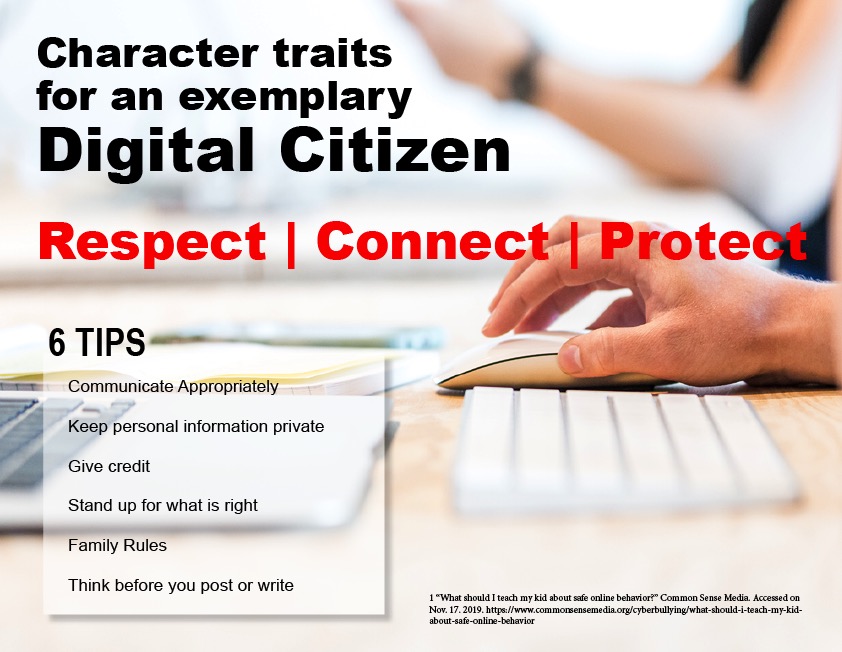
This is an investigation of the following character traits associated with an exemplary digital citizen: respectconnect and protect. These character traits are necessary for students and teachers to foster a positive learning environment in the online community.  The essay describes the traits and provides additional information on their use in an online classroom.

Respect is defined as due regard for the feelings, wishes, rights, or traditions of others. Connect means join together so as to provide access and communication. Protect means to aim to preserve.

Students may forget that they need to extend these three character traits for their fellow classmates and teacher because they don’t see everyone as they would in a traditional classroom. There is a sense of anonymity. Here are some basic guidelines for showing respect, connect, and protect in the online classroom environment. The following character traits were discussed in an article on Common Sense Media.

  1. Communicate Appropriately with one another. You would not text or message a teacher the same way as you would a fellow peer.
  2. Keep personal information private. Information about where you live and personal details should not be shared online.
  3. Give credit. It is important to provide credit for where you got the information. Make sure you cite it. Footnotes and bibliography.
  4. Make sure if someone is bully or being disrespectful that you stand up for what is right. Also, make sure to report inappropriate behavior.
  5. Family Rules. If your family prefers you not visit certain websites, respect their wishes.
  6. Think before you post or write something. Is it something positive, will it hurt someone else?

A social contract is a great way to start a discussion of what respect means to the participants in the online environment. I’ve used this in my classroom and find that it works to benefit everyone and define what our expectations are from one another in regards to behavior.

_____________________________

1 “What should I teach my kid about safe online behavior?” Common Sense Media. Accessed on Nov. 17. 2019. https://www.commonsensemedia.org/cyberbullying/what-should-i-teach-my-kid-about-safe-online-behavior

2 Photograph provided by Lex Photography. https://www.pexels.com/photo/magic-keyboard-1109543/