
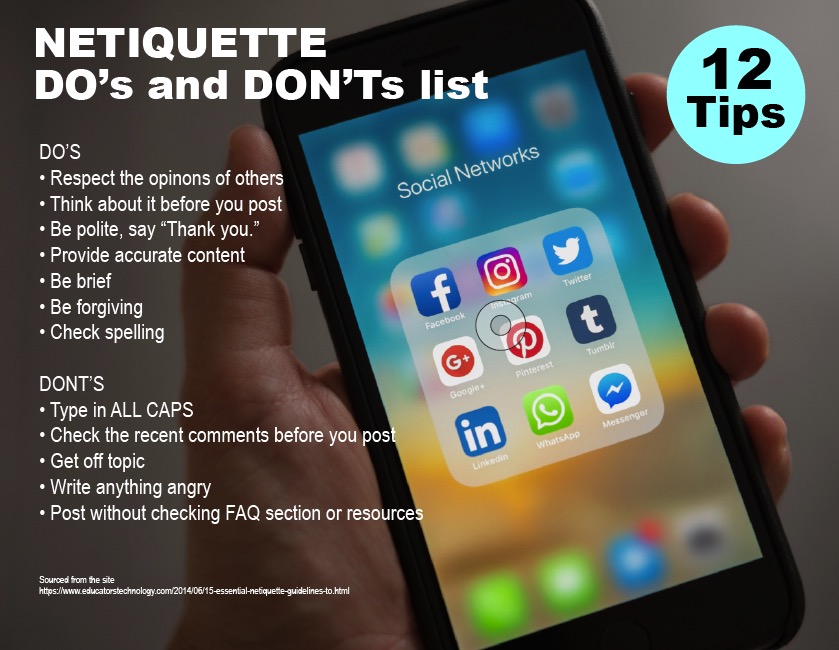
Poster/chart showing the rules of Netiquette. List compiled from 15 Essential Netiquette Guide.
Here is a link to for audio and video recording of this poster.
Poster/chart showing the rules of Netiquette. List compiled from 15 Essential Netiquette Guide.
Here is a link to for audio and video recording of this poster.
Describe the results of researching your level of access to digital resources. Then answer the following questions:
During my researching of my level of access to digital resources, I checked out my Fixed Broadband Deployment from the Federal Communications Commission. I do not have the greatest broadband speed for upload and download. It is the second slowest connection in the neighborhood. In the past, I have had to go to a nearby cafe to upload or download larger files for my content for my students. For online browsing or streaming, it has been fine, but if you are submitting larger files it can be time-consuming. I’m fortunate I can afford to drive and find a cafe, and I have a laptop that I can upload my files with.
1. What types of barriers might impede students’ opportunities to access digital learning?
When I taught in a low-income rural community the access to devices could be a problem. The county decided to go to one-to-one devices. Then the problem became that students didn’t all have access to the internet to do their school work at home. The county then provided hotspots on the buses that they stationed in those areas. Eventually, the buses were removed because they found there wasn’t enough use to justify the cost of it. I can see if you don’t have access to a device or the internet it can prevent you from doing the school work you have been assigned.
2. What might we do to eliminate such barriers?
As I mentioned above having device that they can use to connect to the internet is helpful. Most of my students had smartphones, but it would be hard to design or write an entire paper on it. Providing students with an iPad or Chromebook would be the first step. Then have a way for them to connect to a hotspot so they can access the internet. For students with disabilities having the appropriate apps installed on their devices could help them have things read aloud to them or provide them with alternate ways to understand the content they are learning.
Consider what would be needed to create an ideal digital learning community by investigating the information presented in this lesson.
There is, of course, the rule of three when posting. We had to post and reply to three others that had not received feedback on their artwork. Most everyone commented more than three times. This activity in the community helped rely on each other for feedback in addition to the professors. Each student has certain strengths in color, composition, concept, contrast, or craftsmanship we could all learn from. We would share additional resources. The professor would also provide draw overs on the students’ work see what improvements could be made. The professor also provided video/audio critique feedback, so we felt more like we were in a classroom with her.
I tried several bookmarking services that were new to me. I currently teach the following subjects: graphic design, photography, animation, and game design for high school.
I tried Symbaloo, Google Bookmarks, and Diigo. I’ve been using Google Bookmarks and Zotero for some time, but often Bookmarks can get quite cluttered. I thought Symbaloo looked a bit elementary school-like in the UI/UX design. Diigo was what I preferred. Here is a link to the sites for you to try them out. I also had used Zotero for my graduate course in contemporary art. This is great for tracking the material you are using for sources. It can also create a bibliography for you.
Diigo. This is the link I created from going to Khan Academy for my reflection. https://diigo.com/0fzubv
What is the name of the DLC joined and the reason why the DLC was the most intriguing?
This is a post about my exploring and finding a Digital Learning Community that suites what I teach. I chose Khan Academy. I’ve been a member previously with them. They have resources for animation teachers, because of their online course Pixar in a Box. That is a great series that offers insights into how the stories are created for animations that Pixar creates. I’ve used that with my animation pathway students in high school. Short videos that are easy to digest and keep students attention. Khan Academy has a sound reputation and it has been recommended by teachers I’ve worked with for academic classes.
This is another great DLC. I’ve also been apart of the Adobe Educational Exchange. That is a great resource for digital applied art instructors. I use this for my own professional development. I’ve used it to learn new Adobe software. You earn badges for responding and posting on the community boards. You earn badges for completing free workshops. The workshops are lead by industry experts in the field.
What traits made the DLCs explored more noticeable or impressive than the others?
They offer a wide variety of content related to AP subject matter. I’m looking into teaching AP Studio classes in the future. The content creators they get like Pixar are well-known in the industry as pros.
What is the DLC like?
There are members that post and comment at the bottom of the course. You need to earn 5000 energy points to comment on. Each person has their own profile and you can view it.
What can Digital Citizens do to make the process of joining a DLC more appealing to and easier for students?
The other DLC I’ve been apart of are mostly on Facebook. I’ve been members of groups that people in various applied art fields or education fields that I’ve been invited to join. It is hard for some people to get into these groups because they may seem like they are impersonal. The Khan Academy and Adobe Edu Exchange do a great job because of the free content they provide. Free and easy to understand video content in short lengths are great.
 Mrs. Miller - Messy Art Teacher Blog